JSON mapping
Concept
A JSON mapping is a procedural mapping. The mapping is described by a procedure (a method) written in an extended Java language. Java is extended allowing to embed JsonPath expressions into the source code. Orchestra uses a preprocessor to create plain Java code from this Extended java code. That means that in JSON mapping you may use any Java statement or Java expression because it actually is Java.
But note that currently only Java 1.4 is supported because internally a Java 1.4 compiler is used (Janino). That means that especially generics are not available!
You also should know that the mapping script is nothing more than the body of a method. For each mapping a Java class is generated which inherits from the base class ProceduralJsonMapping.
Creation
-
To create a JSON mapping, click on the plus icon located on the bottom left of the screen and click on Mapping.
-
Click on Script Mapping
-
Select JSON from the Script Type drop down and click 'Create'.
-
Select a name and an optional description for the mapping.
Configuration
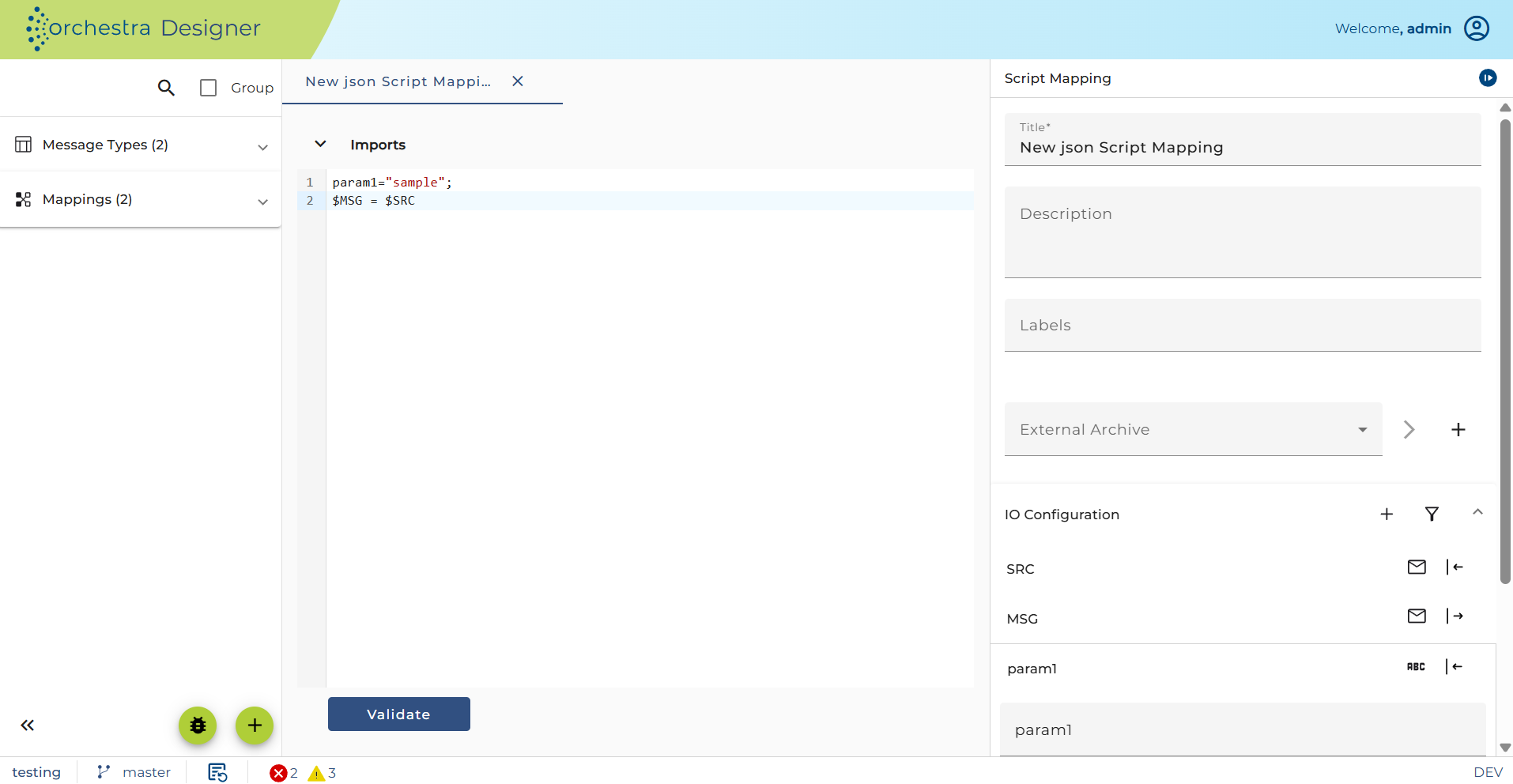
JsonPath expressions
You can find a detailed description of JsonPath expressions in JsonPath. Here is a brief overview:
JsonPath follows the syntax of JavaScript. So to access a property of a JSON object, you typically use the dot notation as you can see in the example above.
To access an item of a JSON array you use brackets. Within the brackets you put a numeric expression whose value denotes the index of the item.
In JavaScript, you can also use the bracket notation to access properties if the expression within the brackets returns a string. JsonPath adopts this notation. It is necessary to access properties containing special characters, e.g. spaces.
E.g. in the example above we use the expression $SRC["given names"] to retrieve the value of the property "given names".
Definite and indefinite paths
JsonPath expressions, built up from a sequence of the primitive operations property access and item access, always returns no more than a single node. This kind of JsonPath expression is called a definite path.
Thus you could assign JsonNode name = $SRC["given names"][0];
There are other JsonPaths returning a sequence of nodes. They are called indefinite paths.
Indefinite paths use wildcards as in $SRC["given names"][*] or filter expressions as in $SRC.access[.type=="phone"].value.
Typically you iterate over indefinite paths in a loop like
for (JsonNode node: $SRC["given names"][*]) {`
    ....
}
Validating JSON mapping scripts
JSON mapping supports validation of scripts via the Validate button.
Clicking this button checks the syntax and correctness of the entire mapping script.
Building up new JSON messages
The task of a mapping is to build a new JSON message, that is a message containing a JSON object or a JSON array.
Basically you use JsonPath expressions as well as certain helper methods to perform this task.
Using JsonPath to build up JSON objects and JSON arrays
In the context of a mapping JsonPath is not only used to query the source tree, but also to build the target tree.
Thus you might write $MSG.person.name = "Thomas"; to create a JSON object { "person": { "name": "Thomas" }}.
Note that nodes are created on demand if they don't exist. Note also that you can only use definite paths on the left side of an assignment.
if you wrote $MSG.person[0].name = "Thomas"; the target message contained { "person": [{ "name": "Thomas" }]}.
In the case of array access there is a restriction. The index must reference an existing item or be the next item of the array. So if the array is empty the index expression must have the value 0, if the array contains one item, the values 0 and 1 are allowed.
Copying subtrees
You may copy a subtree from the source to the target tree using JsonPath.
The most simple example is $MSG = $SRC;
Another example would be: $MSG.Address = $SRC.addresses[.type=="home"];
If the source path references a JSON object a copy of the object is added to the source tree as value of the property "Address".
The methods asObjectNode and asArrayNode
If you know that the value of the node is a JSON object or a JSON array you can use the static methods asObjectNode or asArrayNode,
e.g. in the statement ArrayNode givenNames = asArrayNode($SRC["given names"]);
The methods createOrSelectObjectNode and createOrSelectArrayNode
These two methods are useful to create empty object or array nodes to be filled up later. If the node already exists, then the existing node is returned. Using these methods you can write much faster mappings than repeating the same JsonPath expressions again and again.
E.g. instead of writing:
$MSG.persons[0].name = "Schneider";
$MSG.persons[0].givenNames[0] = "Robert";
$MSG.persons[0].givenNames[1] = "Thomas";
$MSG.persons[0].sex = "m";
It is much more efficient to first create the JSON object referenced by $MSG.person[0] and then add the properties. So instead of the lines above you can write:
ObjectNode person = createOrSelectObjectNode($MSG.persons[0]);
$person.name = "Schneider";
ArrayNode givenNames = createOrSelectArrayNode($person.givenNames);
$givenNames[0] = "Robert";
$givenNames[1] = "Thomas";
$person.sex = "m";
The methods appendNode, appendObjectNode, appendArrayNode, appendValue and appendNull
These methods are used to add nodes to a JSON array. So you might replace the source code
$givenNames[0] = "Robert";
$givenNames[1] = "Thomas";
with
appendValue($givenNames, "Robert");
appendValue($givenNames, "Thomas");
The method appendValue exists in several variants so you can append text strings, integer values, long integer values, double values, BigDecimal values and booleans.
In the example above we use the method appendNode to add every node selected from the source:
for (JsonNode node : $SRC["given names"][*]) {
appendNode($MSG.Vorname.weitere, node);
}
The nodes are actually text nodes containing the given names, but it would work with any other node which then is copied and added to the array.
The method appendObjectNode is helpful if you want to prepare a JSON object node. So we could change our example as follows:
ArrayNode persons = createOrSelectArrayNode($MSG.persons);
ObjectNode person = appendObjectNode($persons);
$person.name = "Schneider";
ArrayNode givenNames = createOrSelectArrayNode($person.givenNames);
appendValue($givenNames, "Robert");
appendValue($givenNames, "Thomas");
$person.sex = "m";
If you want to add a JSON array node to another JSON array node you use the method appendArrayNode.
The methods asString, asInt, asLong, asDouble, asDecimal, asBoolean
These methods are used to retrieve simple values from a query. A JsonPath expression returns a JsonNode or a sequence of JsonNodes (in case of indefinite paths). If you know that the result is a JsonNode of a certain type you can get the value of that node using these methods. E.g. to get the sex of a person you can write String sex = asString($SRC.sex);
In the same way you could write int postcode = asInt($address.postcode); if the node is a numeric node, the integer value of that node is returned, if it is a text node, it is parsed as integer.
These methods never throw an exception. If the node doesn't contain an appropriate value, a default value is returned. E.g. if the node doesn't contain a numeric value the method asInt($<path>) returns 0; in case of asDouble($<path>) the default value is 0.0. The method asBoolean returns false as default value. The method asString($<path>) returns a string representation of the value; if the node represents a JSON null then asString() returns the string "null".
The method asDecimal is a bit different; it throws a ConfigurationException if the node is a text node and the value does not represent a valid decimal number. If the path doesn't exist or evaluates to a JSON null then the default value BigDecimal.ZERO is returned.
To test if a JsonPath expression doesn't find a node you can use the method exists($<path>); if you want to test of the JsonPath returns a JSON null you can use the method isJsonNull($<path>).
Removing a node
To remove nodes from a JSON tree contained in a message variable, you can use the method remove. This is useful, if you want to copy the source data, but remove certain nodes.
E.g. if you want to copy the source object but remove the addresses afterward you could write
$MSG = $SRC;
remove($MSG.addresses);
Actually the method remove removes all JsonNodes returned by the given JsonPath expression from its owning node. That means if a JsonNode is a member of a JSON array it is removed from that array; if it is the value of a property of a JSON object that property is removed from the JSON object.
So e.g. if you want to remove all items from the array addresses which don't have a property postcode, you can write remove($MSG.addresses[!exists(postcode)]
Or if you want to remove the property postcode from all addresses if the postcode is an empty string you can write remove($MSG.addresses[*].postcode[.==""])
The method exists
With the method exists($<path>) you can find out if a node exists. Our mapping contains an example, showing how to use this method:
if (exists($SRC.sex) {
    `String sex = asString($SRC.sex);
    `$MSG.Geschlecht = sex.equals("f") ? "w" : sex;
}
Testing for null values
Sometimes properties exists but explicitly have the value null. But note that you cannot compare a JsonPath expression with java null because a JsonPath expression always returns a JsonNode or a sequence of JsonNode (actually an instance of class JsonNodes). If you want to check if a JsonPath expression returns a Json null you can use the utility function isJsonNode($<path>), e.g.:
if (! isJsonNull($SRC.sex)) {
    String sex = asString($SRC.sex);
    $MSG.Geschlecht = sex.equals("f") ? "w" : sex;
}
The method count
And finally there is the method count, which returns the number of nodes in a query result.
E.g. int pnum = count($SRC.persons[*]);
Other functions
There are a few additional static methods you can use in a JSON mapping:
String lookupInLookupTable(String nameOfLookupTable, String key)lookup a value in a scenario element of type Lookup table.String getMappingName()returns the name of the mappingString getScenarioIdentifier()returns the unique id of the scenario where the mappings belong to.Object getGlobalVariableValue(String name) returns the value of an Environment entry of type Global variable. The name parameter is the name of the Environment entry. Throws aConfigurationExceptionif no global variable with that name exists.